Featured Post

Beolover SyncDrive: DC Platter Motor Replacement for Beogram 4002 and 4004 (Type 551x and 552x)

Late Beogram 4002 and the 4004 (Types 551x and 552x), which have DC platter motors instead of the earlier synchronous AC motors usually suff...

Showing posts with label output. Show all posts

Sunday, July 22, 2018

Beomaster 4400 (2419): No Load Current Adjustment

Here is a quick updated on the Beomaster 4400. Yesterday the Beomaster was powered up for the first time after the restoration. All of the power supply voltages checked out good. Continuing on today I set the no load current. That procedure calls for measuring across the two emitter resistors on each channel with the volume at zero and no speakers connected. The idle current trimmers are adjusted so that each channel is at 10mV to 15mV across their respective output emitters.

To start with I am setting these on the low end of the range so I set each to 10.2mV. I will test with that for a while and monitor the temperatures of the output transistors. Once I am comfortable with that I will look at increasing the output.

Here are the left and right channel adjustments.


I'm afraid I couldn't wait to hear what this amplifier sounds like so I connected up an iPod Nano to TP2 and the Beomaster speaker 1 outputs to my Beovox S-55 speakers (that I always test with in the shop).

I realize it is too early and there are still performance tests to run but the Beomaster sounds great in this first test.

I checked out the FM tuner controls. The large tuning dial and the six presets all work. Stereo decoding appears to be working fine. The signal strength looks strong but I will check everything out further in the next few days.


So far I have had power on the Beomaster for over an hour with it playing through the Beovox S-55 speakers. The heatsink fins remain cool. I will let the Beomaster continue to play for twenty-four hours.


Tuesday, January 30, 2018

Beomaster 6000 (2702) restoration: re-assembling the output subframe

Before putting the output stage PCB back into the subframe there are a few things to take care of. First is cleaning the frame, the heat sinks and the plastic spacers. To remove the glue on the frame I used paint remover followed by some alcohol cleaner and water with detergent. I looks almost as new again!


And after the cleaning...


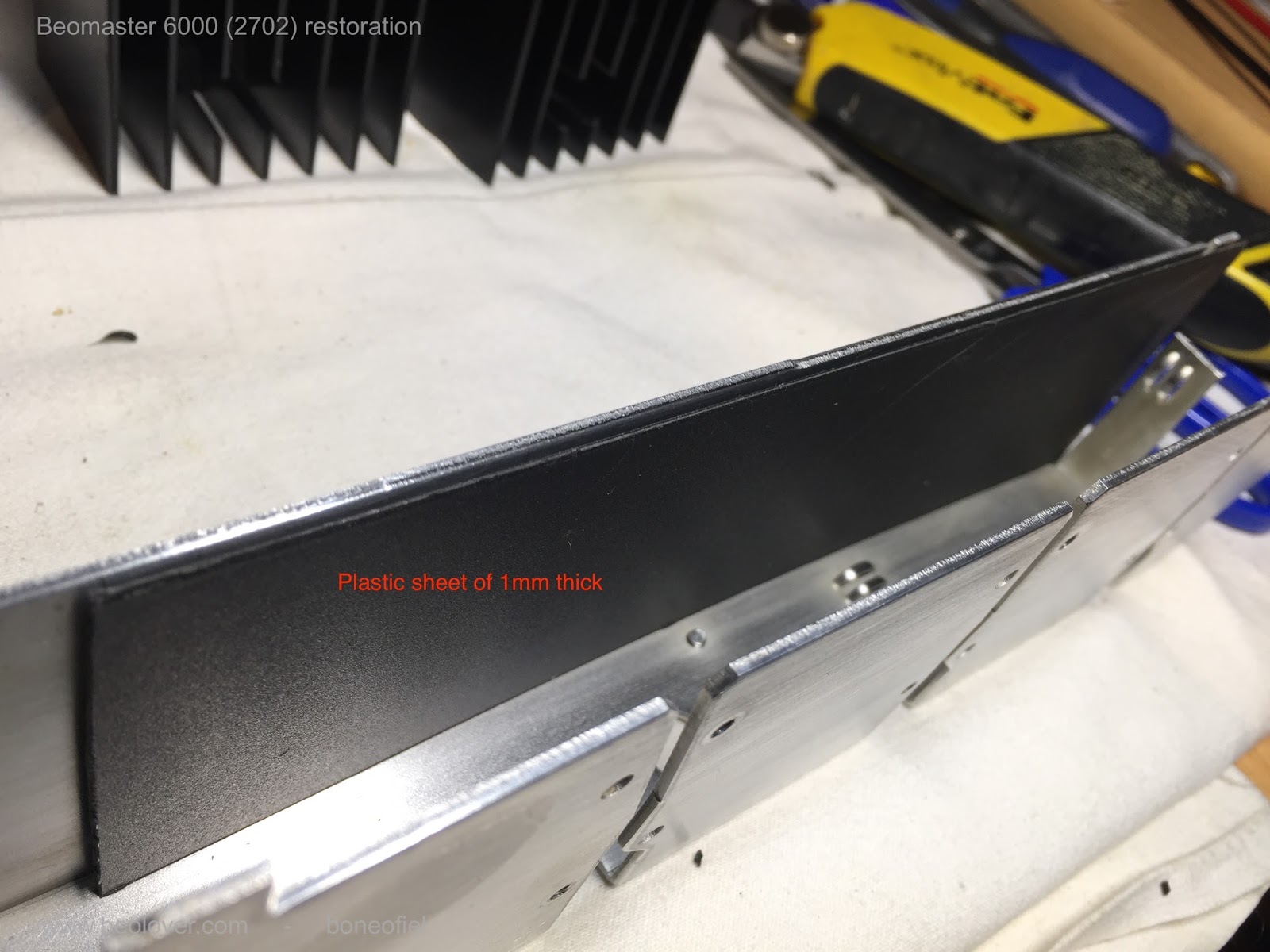
The warping of the output PCB has been mentioned a few times already and to avoid the common short circuits between the subframe and the solder side of the PCB I decided to use a permanent shielding in between. I used a sheet of 1mm thick plastic that I cut to size and glued on the inside of the subframe. Several cut-outs need to be done off course to fit everything back later and to give the wires, screws, etc. the space they need.


When I mounted the PCB I noticed something interesting:  the warping of the PCB was almost completely gone. The reason is simple: the many wires that come from the 8 darlingtons transistors are longer than needed (to allow removal without desoldering) and are "stored" on the bottom of the subframe when everything is mounted. This cable tree however pushes against the board and makes it warp. There are tiny slots on the bottom of the frame (see picture above) that are supposed to hold the board in place. But they are to small and the board jumps out easily. As a precaution (probably not really needed) I glued a small plastic spacer on the board in order to keep the correct distance between board and frame. Again, probably not needed but it helps to get a perfectly aligned and straight board and that looks nice!


Up to the the heat sinks and the output darlington transistors. To make mounting easier and avoid breaking of,  I replaced all the hard wires going the 8 darlingtons and the 4 transistors (that are also mounted on the heat sinks) with flexible wires. AWG 20 (0,5mm²) for the power darlingtons and AWG 24 (0,2mm²) for the other transistors. I tried to respect the original color code and was able to keep all but one original color. Note that the wires all have different lengths !


The mica isolators that are typically used are replaced with sil(icone)-pads. Some of the originals ones where cracked anyhow as you can see in the picture below. I know there is some debate about the pro's and con's of both. Some people stick to mica and use the needed thermal paste. Other swear to silpads. I'm in favour of the latter. It's easier and less messy since you don't need the white thermal paste anymore. I agree that one needs to be careful. These silpads can be punctured if something  (like a tiny ball of solder) sticks between the transistor and frame (heat sink). Therefore it is wise to check the surface smoothness of the transistor (usually the collector connection) and the frame. Also, do not over-tighten the bolts or screws. 


The plastic spacers are fixed to the subframe with a dot of glue, just enough to keep them in place.


The small driver transistors that are used for feedback of temperature and thus allow thermal stability of the power stage (the bias current) do need a bit of thermal paste since they are to small for silpads. One of them was fried on the right output channel and I replaced it with a authorised replacement (MPSA13).


Now all the heatsinks and transistors are mounted on the subframe.


Before moving on to the next phase, I checked a few things to make sure that there was no shortcircuit anywhere, that I had not mixed up the NPN & PNP darlingtons, etc. I found a fault in (again) the front right channel. Something was not measuring correctly. So I had to remove the board again and found a burned resistor 11R69 of 330 ohm that I had not noticed before.  This resistor is in series with the trimmer that regulates the bias current. I did replace all the trimmers before but never checked them for burning out. I did now, and one off course was burned out. Normal, since the driver transistor O1C6 was short circuit on all tree connections!

should be "resistor" of course and not "transisitor"

Checked again and so far so good. But no power yet applied to the board. That's for later.....

Saturday, January 27, 2018

Beomaster 6000 (2702) restoration: recapping output PCB + trimmers

After the complete dismantling of the Beomaster 6000 quad it is time to start the restoration work. I decided to tackle the output PCB first (not the darlingtons yet). This PCB houses the 4 power output driver networks and the bank of push buttons for different actions like: front and rear speakers, loudness, hi/low filters, mono, stereo, SQ decoder, ambio sound and AFC / silent tuning. This bord is long and small and sits in a metal subframe. It is not very well fixed in place and therefore, due to warping of the board, the risk of a short circuit between the print side of the board and the metal chassis is high. NEVER attempt to power up the board while is sits in the metal frame without properly isolating the board from the chassis. I usually put a piece of carton in between (that stays in there permanently). But since the whole unit is now disassembled, a more permanent solution will need to be found (see my next blog about this).


Replacing electrolyte capacitors and tantalum's in a vintage electronic unit is always a good idea. They start drying out, leak or loose there value. As you will see on the picture below, one of the ROE caps had a serious crack and was leaking. Very common. I always replace electrolyte capacitors with quality 105C ones that have a longer lifespan. The tantalum's are also replaced with quality electrolytes. I like to use MKS's, but they did not fit in the narrow space on this board. I have seen exploded tantalum's in the past (in a Beocord 5000) and several ones that where short circuit. This failure mode, specifically on older types, is called Field Crystallization and is the major reason for degradation and catastrophic failures of solid tantalum capacitors. It causes a dielectric breakdown and happens very fast (milliseconds).


The recapped output PCB


As you may notice, I also changed the trimmers for the bias current setting (quiescent current). The originals are small 1-turn types that are a bit difficult to reach and not easy to set at the correct value. Moreover, the risk of making a short circuit when setting them with a non isolated screwdriver is high (some readers will probably smile now...!). I replaced them with encapsulated 22 turn trimmers. I prefer to use the long type since they give a bit more stability and makes it easier to reach the small turning knob. Off course, one needs to redirect the wires to make them fit into the 3 existing holes from the old trimmers. It's a good idea to make sure the turning direction of the new ones versus the old ones is the same (fully anti-clockwise for lowest current setting).


And here's a view of how the trimmers are rewired. Make sure the wires are not touching each other. Use some isolating tape or heat shrink tubes.


Earlier on I noted already that one of the front right output stage darlington transistors was fried. It was time now to check if the driver section was still OK. And it was not. The emitter resistor of 0,12 ohm was "open" and the BC312 was also fried. I have spare original ones available so replaced them as well. 

This is a picture of all the caps, trimmers, resistor and transistor that where replaced on this board. Old en new together !


And here are the 4 tantalum's that where replaced with electrolytes.


Next I will tackle the subframe with the 8 darlington transistor and there cooling plates.

Friday, December 9, 2016

Beogram 8002: Transplantation of Output PCB

Finally I had some time again to work on the Beogram 8002 that I recently started to restore. The last two weeks were an 'interesting experience' after Michael Fremer's video appeared on analogplanet.com featuring my CleanerVinyl ultrasonic vinyl cleaning equipment

The next step in this project was to transplant the DIN7 output assembly from a parts-Beogram 8002 that I acquired from a crooked audio repair shop in Chicago. This unit is now coming in handy here since the 8002 was missing its DIN7 output cluster:
I always wonder what drives people to do such things, but here we are on our interesting little self-absorbed planet...;-).

I extracted the assembly from the parts 8002:
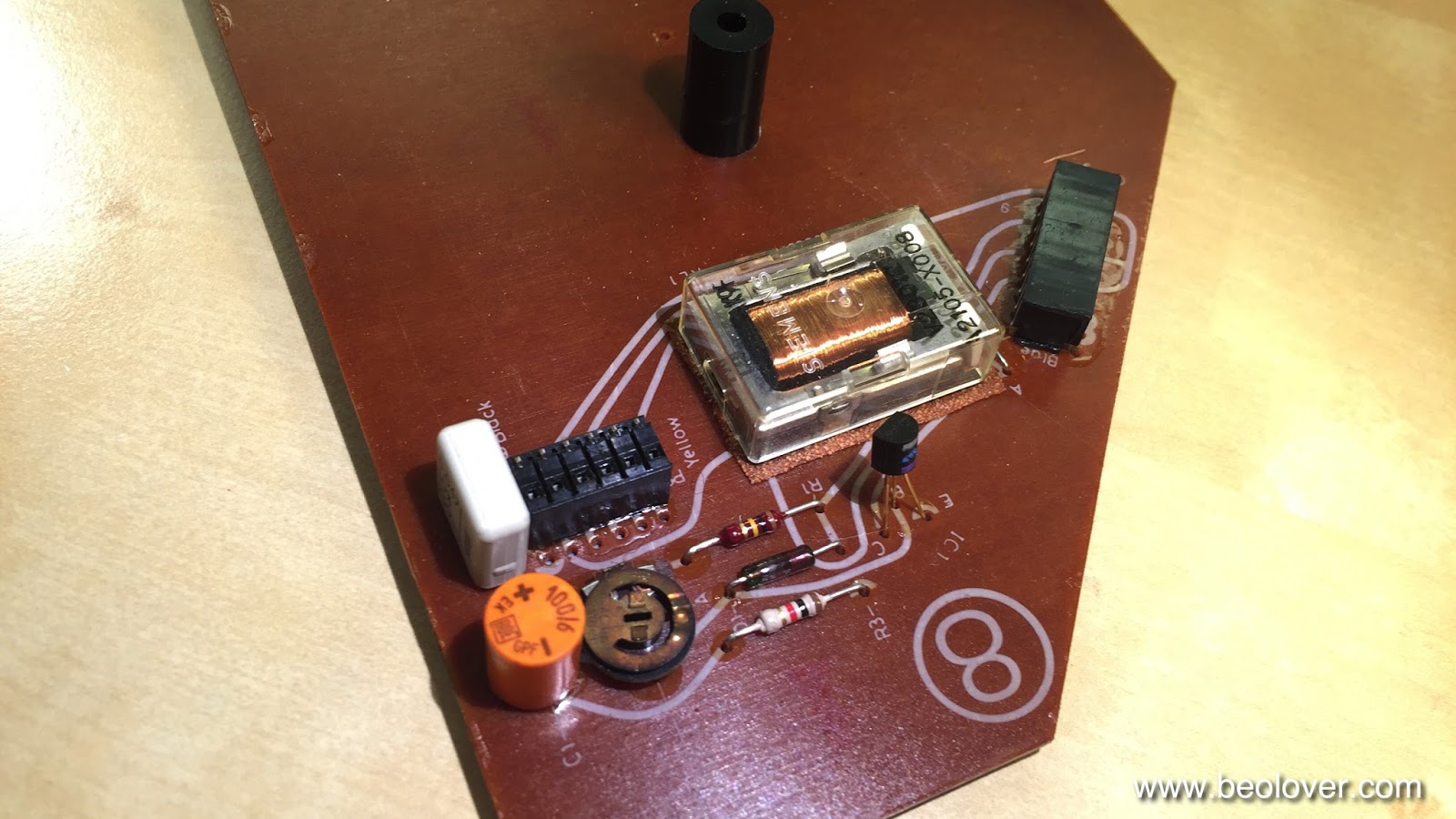
I decided to update the relay with a modern encapsulated unit while I had everything on the bench. The original Omron G2V-2 relay can easily be replaced with its modern G5V-2 cousin, which has the same footprint:
And here is a photo of the installed new relay:
and with its shield clamped on:
This shows the restored wiring:
After verifying that the relay worked properly I installed a grounding switch that allows to connect signal and system grounds if there is a hum problem:
On to the two other issues that I was able to identify: The deck does not detect the absence of records and happily lowers the arm onto the platter. It also has a missing digit in the RPM display. One step at a time.


Thursday, October 27, 2016

Beomaster 8000: Step One - Rebuilding the Output Amplifiers

While we wait for Nick's awesome specially made pulley for the Beogram 4002 (5501) that I just finished up, it is time to get started on the Beomaster 8000 that will also go on to the UK once restored. It recently arrived and I gave it an external inspection, which suggested this 8000 is an excellent starting point for a full restoration.
My first step in any Beomaster 8000 project is to rebuild the output amplifiers. They are the most crucial part of the restoration of the 'power' part of the unit. A failure of their often corroded quiescent current trimmers usually neatly kills all output transistors with a bit of smoke emission on that channel before the main fuse protects the transformer (and the breaker of the house grid on which the 8000 resides while this burnout happens). These old trimmers often go open circuit during transport, so my approach is to not even turn the unit on when I receive it, but I go straight to the amplifiers and rebuild and test them to make sure that the above does not happen.

Here are a few impressions from this effort on this unit:

This shows the right channel as it came:
We see from the two clunky (white) emitter resistors that the above mentioned disaster already must have happened at some point. When the transistors burn out, the emitter resistors usually brown like a chicken in the oven due to the immediate heat emission. But usually this does not affect their performance down the road since they are wire wound types. An ugly replacement like seen here is definitely not an improvement in the Beolover's eyes! Also, whoever did this did not learn 'The Lesson'...he did not replace the trimmer! I always put in 25 turn precision encapsulated units to prevent this from ever happening (again). Multi-turn trimmers drift only very little and so the quiescent current adjustment is very stable over time. This is not the case for standard single turn trimmers, and that is one of the reasons that the 8000 often presents with one or two hot heat sinks, if it runs at all.

This shows the rebuilt board with new electrolytic 105C type capacitors and prettier resistors and the 25-turn trimmers:
Beautiful! I did the same to the left channel, which did not have new emitter resistors, but (slightly browned) original resistors. And then it was time to run these babies from external power supplies to test for any silicon failures, cracked traces and the like. This shows my hookup:
And here with the multimeter connected to the test points at the emitter resistors after powering the board up:
When installing a new trimmer make sure that the resistance is close to zero. This may be counterintuitive, but in this setup it turns off the output transistors preventing significant current flow between the +/- power rails. This shows my bench supplies at this point:
The left two are the - and + rails, which draw 60-70 mA while the quiescent current trimmer is close to zero Ohms. The right supply provides the 15V control voltage that is used by the Beomaster to enable the output by controlling the constant current source used for biasing the output transistors.

Adjusting the quiescent current means to ramp up the resistance in the potentiometer to set the working point of the output transistors that there is a 18mV voltage across the two emitter resistors:
At that point the power rails draw 0.1 (+) and 0.11(-) A:
I did the same for the right channel:
All good now in the output amplifier department! On to rebuilding the power supply board before giving this unit a first spin!


Monday, March 14, 2016

Beogram 4000/4002/4004 Relays: Professionally Manufactured PCBs!

I recently redesigned the Beogram 4000/4002/4004 relay adapter boards to be manufacturable by a professional PCB supplier. I started filling orders with the new boards. Today I made a bunch and I thought they look quite Beolovely!

Here is an impression:
They are available for both the old-style Siemens and the newer vintage National relays that are found as RPM and/or signal path grounding relays in the various 400x models. The boards simply drop into the footprints of the original relays. The relay featured on these broads is a modern encapsulated relay made by Omron, a major Japanese manufacturer. They are rated for a minimum performance of mechanical 50,000,000 and 100,000 electrical operations under load (1 Amp). Since the current switched in the Beogram applications is minuscule, they will last probably close to the mechanical performance limit, meaning that they will probably outlast the rest of the turntable by far. 

These blog posts give an impression about their installation in various Beograms:


There is also a video about replacing the RPM relay in a Beogram 4000:

Thursday, February 25, 2016

Beogram 4002 (5513): Rebuilding the Output Board, Installation of a Grounding Switch and Repair of the Keypad

The Beogram 4002 (5513) that I am rebuilding right now is nearing completion. Today, I did the output PCB (#8) and I repaired the keypad which had a loose key stop.
This shows PCB #8 in original condition:
I like to replace the output relay, since they often get stuck on one or both channels as they age. Fortunately, it is the same relay that is used for switching the platter RPM and so my replacement relay boards fit here, too:
These parts are available to other enthusiasts, just send me an email.
This shows the relay and the capacitor replaced:
The red switch allows to connect the system and the signal grounds. This can help if there are hum issues due to improper connections within the amplifier or the cable (usually when RCA adapters are used that do not breakout the system ground).

Before I put the board back in, I also fixed the keypad. It had a loose key stop that caused one of the keys to pop up above the pad surface:
This shows the STOP key from the back with the loose stop:
I glued the stop back on and also reattached the loose pad strips on the sides:
This shows the end result of this repair:
Beautiful! On to adjusting the chassis and the platter.