Featured Post

Beolover SyncDrive: DC Platter Motor Replacement for Beogram 4002 and 4004 (Type 551x and 552x)

Late Beogram 4002 and the 4004 (Types 551x and 552x), which have DC platter motors instead of the earlier synchronous AC motors usually suff...

Sunday, April 8, 2018

Beomaster 6000 (2702) restoration: checking, power-up and calibration

Everything is back into the chassis and now it's time to do a last check of all the wiring and powering up. It's important to make sure that no wires have been cracked, became loose or touching the chassis. This may seems obvious, but it is so important in a Beomaster 6000 quad because the space is so tight and most wiring is done with hard wires. I took all the time that I needed and found one wire broken off: a ground connection to the pre-amp.

So, a last peek inside before powering up......


I plugged the unit into my Variac transformer, gently raised the voltage to the required 230V and...........it fired up on all engines! I selected a FM station and listened to Katie Melua's version of Louis Armstrongs "What a wonderful world" ! And indeed it was......

That was a big relief. You never know what will happen after such a big restoration. But, off course, I had tested everything already before putting it al in the main chassis (check here). 

Some final calibration was now needed. I started with the power supply. I had done this before when restoring the power supply PCB, but under load settings may change. I found some slight variation. The +18V had now dropped to +17,85. Not to bad. And the -5V was now -5,1V (not sure why it went up). With the new trimmers in place, it was easy to recalibrate to the correct voltages.


On the same power supply PCB, a trimmer is located to balance the FM reception lights.

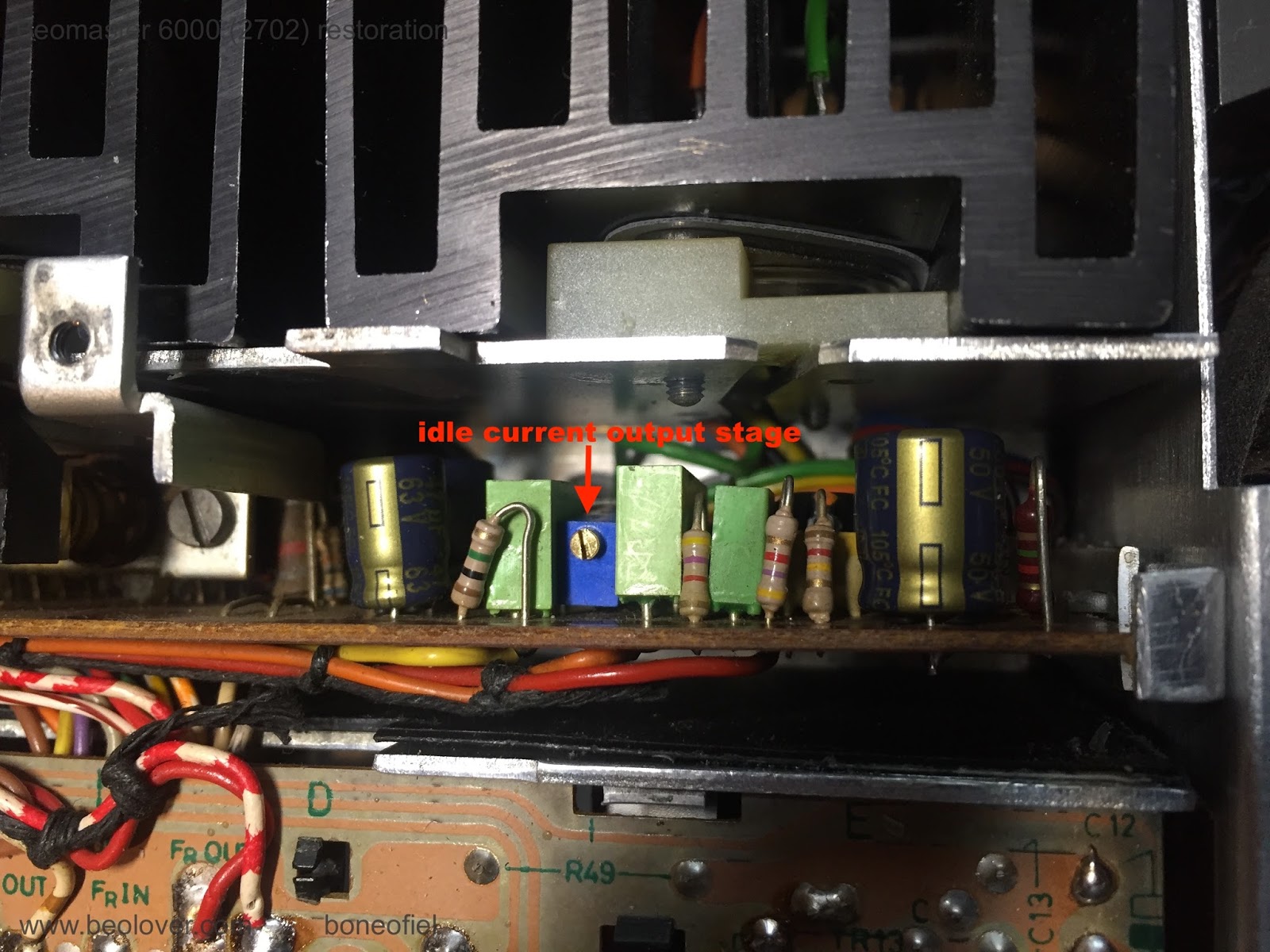
The idle (quiescent, bias or no-signal) current was already set before, but I checked it again by measuring the voltage drop over the 2 emitter transistors (0,12 ohm), in series, that are in each set of the Darlington output stages. The service manual describes to measure directly on one of the collector resistors on the PCB. They are very difficult (if not impossible) to reach once the PCB is in place in the subframe. The easiest way is to measure directly on the emitter contacts of both Darlington transistors (PNP and NPN pair) on the cooling elements (white & green wires in below picture). The correct setting in this case is 14,4mV (2x7,2mV). The extra base-emitter current that flows through the emitter resistors together with the collector-emitter current, is neglectable.


Next was the FM bottom voltage adjustment. The manual describes +4,5V. The FM tuner is driven by a variable DC voltage and to make sure that lowest FM frequency is correct and corresponds with the display, this bottom voltage needs to be set correctly.


Another series of adjustment are related to the FM display board with the signal strength meter, the stereo light and the tuning balance lights.


Other calibrations (like the ultrasonic receiver and the Commander remote) have been done before (see here).

Up next is the mounting of the FM display scale and fixing a new dial cord.

Beomaster 8000: Output Amplifier Restoration - Left Channel

The left channel output amplifier board on this Beomaster was in a little better shape than the right channel board. There were some heat darkened spots on the circuit board but no burn crater like the right channel had.


The 0.18Ω emitter resistors (5R236 & 5R237) were not as bad as the right channel either but had some bad enough spots for me to decide and replace them.


Like the right channel output amplifier board I replaced the electrolytic capacitors and the two trimmer resistors (idle current and DC offset).

Here is the recapped board.


I also remounted the TIP141 and TIP146 darlington transistors on the heatsink with sil-pad strips I cut from a large sheet.


Next was the bench test to adjust the no-load (idle) current.


The left and right output amplifier boards are ready as well as a couple more spare output amplifier boards that I decided to do at the same time (since I had all of the parts out).


Saturday, April 7, 2018

Beogram 4000: An Entertaining Afternoon Exploring the Record Detection Circuit

While exploring an issue with the differential stop circuit of the Beogram 4000 that I recently finished restoring, I noticed another strange issue: While record detection worked at the 12" (LP) set down point, it often failed at the 7" (singles) point, i.e. when starting the deck without a record on the platter, it would pass by the LP point, but then set down at the singles point.

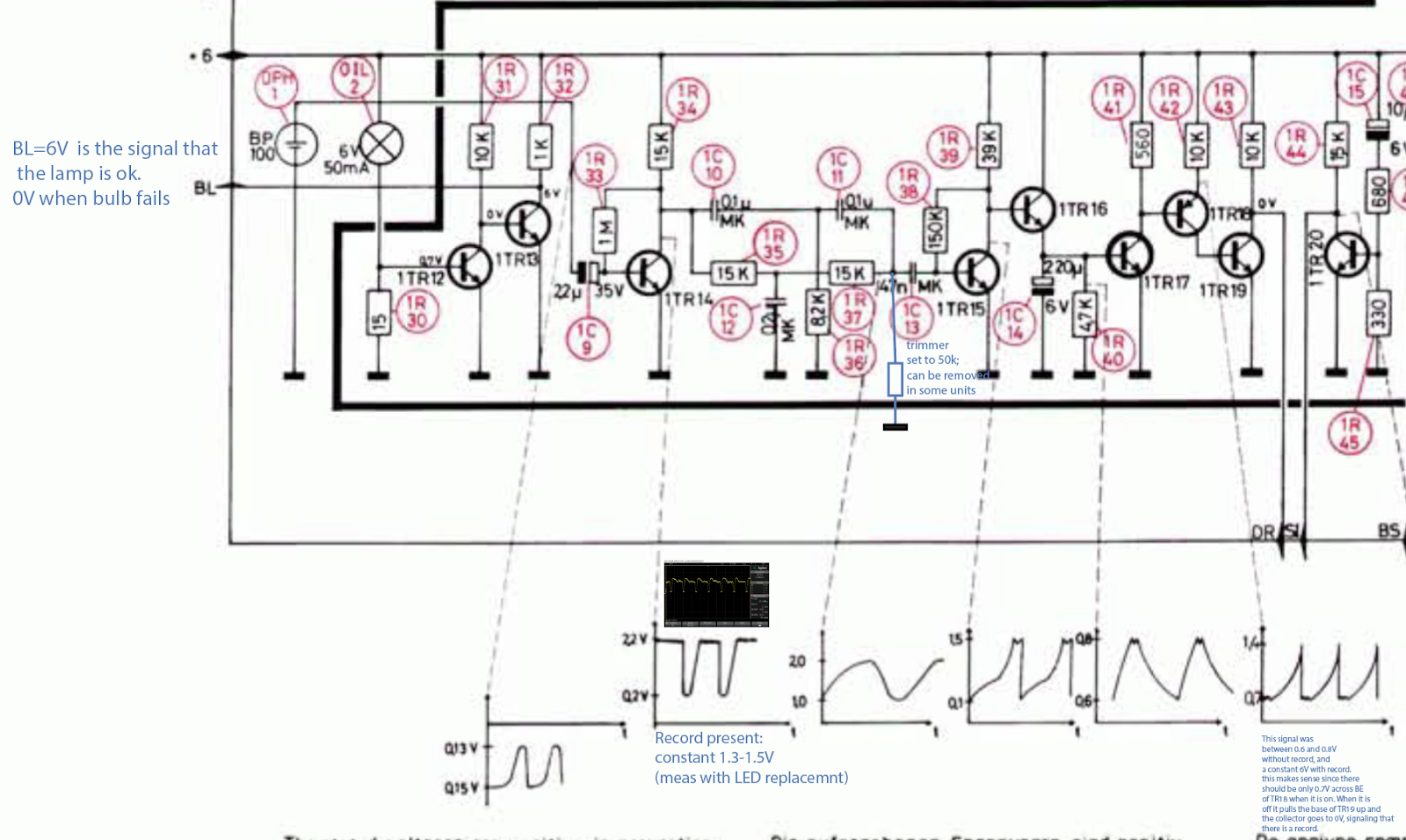
But let's first have a look at the circuit diagram: This shows the relevant section covering the detection system:


The sensor signal from BP100 on the left is fed into the base of TR14 via C9. TR14 provides an initial amplification of the weak sensor signal that then is processed further into a digital output signal for the control system. The signal is filtered in a RC network and fed through TR15,16,17,18 which essentially provide current and signal inversion resulting in a digital output signal from the collector of TR19, which is the "DR" input to the control logic in the keypad. DR is 6V if a record is present and 0V if there is no record on the platter. 
So the first step of my investigation was to measure IN and OUT signals of the circuit to see if the issue is in the circuit (and not in the control logic). This is what I got:
The green trace is the amplified sensor signal at TR14. We see the usual oscillation as the ribs on the platter pass underneath the sensor. These oscillations are as specified (~0.2-2.2V), i.e. my LED replacement of the light bulb was still working fine (as expected!...;-). The yellow graph is the DR signal. We see that in the beginning as the sensor arm passes the small gap between home position and platter the signal is 6V as it should be (the gap has no ribs, i.e. it looks like a record to the detection system). Then, when the oscillations start on the green curve (sensor is now over the platter), there are a few strange oscillations in the DR signal before it settles into the prescribed 0V indicating that there indeed is no record. However, as the carriage travels further in, these oscillations start again and then even temporarily give way to a constant 6V stretch before the oscillation starts again. Absolutely not like it should be! When everything works properly the yellow signal stays solidly at 0V until the carriage returns home. 
After having a bit of a think I concluded that TR19 was not providing enough current to the three logic gates that are fed with the DR signal. From the FHC131 datasheet I learned that these ancient gates take an impressive 2 mA per input when they are pulled low. So it seemed that TR19 was not fully on, causing its collector to drift towards 6V. The oscillation is probably a result of the fact that when CE goes high resistance, the BE current is concurrently reduced allowing the voltage from the (feeding) transistor TR18 to recover until the process starts anew.
After this illuminating moment I wondered about the root cause of this issue. Often one can find circuit problems by simply looking at the circuit to see anomalies like heat traces or the like. In this case my eye fell on the strange trimmer that one finds soldered to the main board on the solder side in most Beogram 4000s:
It is not on the circuit diagram. It is a 50k trimmer that connects R37/C13 to GND (I added it to the above diagram in blue). I checked the four 4000s that I have currently around, and their trimmers were all set to the maximum 50k value...somehow this suggested that whoever adjusted them seemed not to think much of them, trying to reduce their current draw as much as possible. At this point I am a bit mystified why the trimmer was added as an afterthought by the designers...there must have been some issue with the circuit under some circumstances, maybe a parts tolerance issue.

Anyway, experimentation and hunches often yield a fix and so I hooked up the oscilloscope to the collector of TR15 and measured with and without the trimmer connected. Disappointingly the curves looked very similar like this:
About what the diagram above suggested. This frustrated me a bit, but there was no stopping at this point and I marched on, connecting the oscilloscope to the collector of TR18, which feeds the base of TR19, i.e. if TR19 has trouble staying on while delivering 6 mA, there needs to be a difference in the TR18 output. And bingo, the trimmer made a big difference there. This is the signal with trimmer:
We see big spikes towards 6V, while the diagram suggests spikes no larger than 1.4V. I took the trimmer out and measured this:
Very small spikes, meaning that in this case TR19 was basically permanently on since TR18 stays fully on, i.e. TR19 should have no trouble providing 6 mA into the gates of the control system. And indeed, with the trimmer gone, the 4000 record detection mechanism started working very reliably. So the lesson learned here is to not only check the signal at TR14, but also at TR18/19 to make sure that the DR signal is stable. Alright, time to enjoy another record one this lovely Beogram 4000! Let's see if that was the last act of this eventful restoration.

**************************Note added in proof***************************************
The great Dillen of Beoworld.org sent me a message after I posted this. He indicated that this trimmer was added to the 4000 circuit as a way to adjust the sensitivity of the circuit due to the advent of transparent vinyl records. If there is a transparent record, the ribs of the platter are visible to the sensor at varying 'contrast' depending on the color and widely varying translucency of such records.
So I went ahead and experimented a bit more using a translucent red and completely clear record. This particular Beogram 4000 was able to detect both without any ambiguity with trimmer absent. 
However, this does not mean that this is the case for all Beogram 4000s, since the sensor circuit is designed with analog amplification stages that are biased using a single BC resistor. This makes the gain dependent on the individual current gain value (Hfa) of each transistor, which can vary significantly, even if the transistors are from the same production run. So this issue is something to keep in mind when working on the 4000 and a verification of proper detection of clear records should be part of the 'standard restoration repertoire'. The joyful exploration of analog control systems continues!..;-)


Friday, April 6, 2018

Beomaster 6000 (2702) restoration: putting all PCB's back into the main frame

After some vacation, a business trip and a few other urgent repair projects, it was time to get back to the big Beomaster 6000 quad restoration project ! Last time, after a successful test of the unit outside of the main frame (click here), the main power transformer, power caps and rectifier were put back into the main chassis together with the added extra fuse (click here).


When checking all the PCB's and figuring out a way to put everything back into the chassis without desoldering all the boards, I discovered a few issues. The first was the aluminium hooks that I added to the power stage output board (click here) to hold it firmly in place. The glue did not stick....and the hooks where loose. So I decided to glue them back with epoxy  glue to make the bond stronger (in stead of the "one second glue" that I used originally).


The second issue was the main power cord and the way that cable was going to the fuse box. It's difficult so see in below picture, but the cable was outside the transformer box and preventing the subframe with the 4 output stages to sit flat on the main frame. The cable was supposed to be going inside the transformer box.


OK a 10 minutes work. Done. Now let's put everything back in the chassis. Should be easy, if you know how to dismantle something, just do in the reverse order.....Maybe this is true for a IKEA furniture, but not so with a Beomaster 6000 quad ! So many wires that need to be carefully moved around to avoid braking off at the soldering points. Luckily I took plenty of pictures before disassembling and I also have another unit laying open so I can peek inside that one!

But still.......It all looked too big to fit in there....


But after about 1,5 hour of gently moving the whole bunch of PCB's, cabling, subframes, etc., off course it DID fit in there !


Time for a pause now. Next will be a thorough check of all the wires, screws, bolds, etc. before powering it up. And still a lot more to be done: the FM dial display, the dial wheel with the cord, the key panel, some more calibration, the red plexi display and the wood plinth. Stay tuned !


Thursday, April 5, 2018

Beogram 4000: An Entertaining Evening Exploring the Differential Stop Circuit

Before we send a restored unit back to a customer, we always give them a good 'real world' test, where we simply play a bunch of lovely music over a couple weeks and observe if everything works consistently. The listening part is of course part of the fun of Beoloving! There is always music in the work shop! The case of a recently restored Beogram 4000 is a proof in point of the usefulness of such testing phases: While playing a number of records, I noticed that occasionally the arm would not return to the home position once the end groove had been reached. Normally, the Beogram 4000 detects the end groove spiral due to the higher speed of the carriage and then lifts the arm and returns the carriage. Not in this case, though, where the needle simply went all the way in and then kept playing the final turn over and over again...tock...tock...tock...not very Beolovely!

The problem was that this would only happen occasionally, but most times everything would be fine. Such problems are hard to troubleshoot. In the beginning I thought it was simply a MV switch issue (most 4000 issues come from not working switches), but since I had coated the switch terminals with gold, tests demonstrated that the switch was working very reliably. So I concluded the problem must be in the differential stop circuit, which produces the logic DS level that tells the control system that it is time to lift the arm and return the carriage home. This shows the relevant part of the Beogram 4000 circuit:


This is how it works: The detection of the end groove is done via the carriage motor voltage. Since the end groove typically makes the carriage move faster, the motor voltage is larger than during normal play back of a track. That is why the circuit is called Differential Stop (DS), the end groove is not determined by the position of the arm, but by its velocity towards the center of the record. One of the issues is that the arms do not only move faster in the end groove, but also between tracks and in the run in groove at the outer rim of the record. This problem is solved by introducing a carriage activated switch ("MV") that enables the DS circuit only close to the end groove region of the record. This switch is on the second circuit diagram of the 4000 and it connects MV and MV' in the above circuit snippet.
So when the carriage reaches a point about 65mm away from the center of the record MV and MV' are connected. This causes the voltage that is applied across the motor to be applied across base and emitter of TR24 via 1R54 and trimmer 1VR4. The trimmer is used to adjust the carriage speed threshold at which TR24 turns on (this adjustment turned out to be the critical item during this exploration...read on...;-). When TR24 turns on due to high carriage speed, it then turns on TR23 which serves as an additional input that allows other functions of the turntable to disable the DS circuit (mainly system requested and manual FF function via TR25). When TR23 turns on TR22 becomes conductive and grounds its collector. This causes the logic signal DS to go to 0V. DS then activates carriage return via the logic ICs in the control panel. This immediately turns off the DS circuit since the motor voltage reverses (the MV switch remains closed until the carriage clears the switch on the way back to home position). The result is an about 5-10ms pulse at DS as is shown in this oscilloscope snap shot:
The blue trace is the DS signal. Green and yellow are the (motor) voltage measured on both ends of the MV switch against GND (since it is closed at this moment both traces are the same).
We see that when the motor voltage changes due to the reversal of the carriage direction the pulse terminates.

Ok after this circuit discussion...back to the 'issue' that I was trying to solve, the occasional not working of the DS mechanism:
After I verified that the MV switch worked reliably, I thought the issue must be an intermittent problem with the DS circuit. Since the issue was very intermittent, I used an Arduino as event recorder:
I used one of the pin change interrupts to detect the state of DS and print it out on the serial port whenever it would change from 6V to 0V, i.e. when the circuit activated DS. Then I played some records and waited for the issue to happen. Luckily the second record I played triggered the issue. And, guess what, DS indeed did not change. This told me that the issue is in the circuit. I played another record, and it worked again. Then I put on the previous record and it happened again! This finally turned on some light bulbs in my head. I put the other record on and it worked again! The light became very bright in my head and I concluded: It is the record, dummy! The circuit was basically working, but the records are different! This shows the end grooves of the two records in comparison: First the one that made DS work properly:
and the one that caused DS to fail:
What is the difference? The number of turns the end groove takes until it hits the innermost groove. This means that the first record makes the carriage move faster than the second does. The consequence is that the motor voltage is lower when the arm reaches the end groove of the second record. This shows an oscilloscope trace of the motor voltage (measured by connecting the oscilloscope trace to one motor pin, and the oscilloscope GND to the other) as the needle goes from track to end groove:
The waves on the left are the normal voltage fluctuations on the motor as a track is played. Then as the end groove begins the voltage goes down and then the shoots up as the voltage across the motor is large enough to trigger TR24. So it appears that the non-triggering record simply did not cause the voltage to cross the threshold. I ended up adjusting the VR4 trimmer a bit clockwise and then the mechanism worked also for the second record, yet still played the last track to the end (a good test for that is playing a single, since their single track usually extends into 'MV switch closed territory'). So in the end, nothing was wrong, just the adjustment needed to be changed a bit towards more sensitivity. 
An interesting thing to note is that the service manual prescribes to adjust the sensitivity that DS gets triggered at 1.8V motor voltage. This is obviously too sensitive since the amplitude of the waves in the oscilloscope trace above is about 2.2V. If the threshold were adjusted to 1.8V DS would be triggered during normal playback and not only in the end groove. The joys of analog control systems!


Beomaster 8000: Output Amplifier Restoration - Right Channel

I observed in a previous post that one or both of the output amplifier boards in this Beomaster 8000 are not an original board to this unit. That is okay as long as both boards work but it raises interest in this Beomaster's history.

Here are the right and left channel output amplifier boards again.


Most of these boards use BC546 and BC556 transistors for 5TR201 through 5TR204. The right channel board here has BCY65 and BCY77 type transistors instead. I am guessing they were replacements for original BC546 and BC556 transistors that failed (or were suspected of failing). The right channel board also has a really bad burn spot on the PCB underneath 5R244, 5R247 and 5R246. Those resistors have been replaced. The electrolytic capacitors on both boards are all replacements (from the originals) and are all the same brand so these boards were together for a previous recap.

Here is a closer look at the right channel output amplifier PCB condition.


The damage on this board by the original resistor is significant. I decided to fill the hole with epoxy to help protect the integrity of the board.


I installed new carbon film resistors for 5R244, 5R247, 5R246 and 5R245. I raised the resistors off the board a bit when I soldered them in.


The burn damage on the PCB had also created some damage to the trace side of the board.


The previous fix looked like it probably is okay but due to the observable damage I decided to check all of the components on the board as well as reworking the traces on the board.


I also recapped the board with 105°C rated capacitors.


I cleaned off the old mica transistor insulators from the big heat sinks and installed sil-pad strips for the Darlington transistors.

Here is the reworked right channel output board ready to be bench tested.


As I have done on other Beomaster 8000 output amplifier bench tests, I apply ±55V rail voltages, ground and a +15V control voltage that turns the output amplifier on. This will allow me to check that the output amplifier components are working and adjust the no-load (idle) current of the amplifier board.

On my two bench power supplies that provide the ±55V I setup the supply current limiting to 150mA. This will protect the board and supplies if something is wrong.

The ±55V power is applied first with the +15V control power supply at 0V.


Once the ±55V voltages are set I apply 15V with the third power supply to turn the output amplifier on. From other Beomaster 8000 output amplifier bench tests I expect the "on" state to result in 100mA to 110mA of current on the ±55V supplies.


Now I can check and adjust the no-load (idle) current setting for the output amplifier board. The service manual calls for 18mV as soon as the output amplifier is enabled.


The initial idle current setting has been made for the right channel. I will do the same thing for the left channel output amplifier board.