Featured Post

Beolover SyncDrive: DC Platter Motor Replacement for Beogram 4002 and 4004 (Type 551x and 552x)

Late Beogram 4002 and the 4004 (Types 551x and 552x), which have DC platter motors instead of the earlier synchronous AC motors usually suff...

Friday, November 20, 2015

Beogram 4000: Redesigned Drop-In Tracking Sensor Light Bulb Replacement

It was time to replace the tracking sensor light bulb in the Beogram 4000 that I am restoring right now with the SMD LED based replacement light source that recently I developed. I used this occasion for redesigning the part with the aim to incorporate the intensity adjustment trimmer into the light shield of the source to hold it firmly in place. I did not like that the trimmer was only held in place by the leads in my previous design, which resulted in a slightly wobbly appearance when adjusting it. In other words, this part was not yet fully up to Beolover standards!

So I designed a new circuit board which allows to directly solder the trimmer to it. This, however, required the concurrent redesign of the 3D printed housing part to enable the trimmer to protrude from the PCB. Here are some pictures. This shows the original light source.


This Beogram had the optional 100R trimmer installed that is mentioned in the supplement of the service manual. This allows the adjustment of the intensity of the light bulb which is a great feature that much simplifies the adjustment of the tracking feedback circuit sensitivity. 
This shows my redesigned part from the light source side. The LED is powered by 6V as it would in the Beogram 4000:


This shows the part from the other side prepared for insertion into the tracking sensor

The potentiometer protrudes through a opening in the plastic part and looks now fully integrated. Lovely! The negative lead is curled around one of the bolt holes. This makes the ground contact (the Beogram chassis is tied to the system ground). This setup essentially copies the original setup with the 100R potentiometer. The other lead is bent up to be able to go into the 6V rail solder point on the PCB from below:

After the installation I adjusted the tracking sensitivity to the prescribed 4 rounds of the record before the tracking mechanism kicks in after the needle is put into the groove. A few months ago I made a video about the tracking mechanism and the adjustment process:

Wednesday, November 18, 2015

Beogram 4002/4004: Adjusting the Tonearm Lowering Limit

While the Beogram 4002 that I currently restored has safely returned to its owner I still owed a report on the final tonearm adjustments. Beolover blogs all tasks that are performed during a restoration! So here it is as promised:

An important adjustment on the tonearm assembly is the arm lowering limit. This limit prevents the needle from hitting the platter ribs in case the photosensor in the sensor arm fails. The electronic control circuitry has no way to detect this issue and prevent the arm from lowering. If the sensor fails the system will interpret it as 'record present' and lower the arm. This is the main reason why B&O came up with the lower platter rib areas, which are located at the touch down points for LPs and singles. This allows giving the arm a lowering limit that can be below the surface of the record, while still prevent the stylus from being shaved off by a rib should it ever touch down without a record present.

I made a short video about this important adjustment:


After I did this adjustment, I also adjusted the zero weight of the arm (see here for a video how to do this) and installed a nut and a washer to replace the original retaining washer that keeps the counterweight adjustment screw in the assembly. Unfortunately this washer results in a lot of play in the mechanism, which can result in a change of the zero force adjustment during shipping and set-up, i.e. is not acceptable for a Beolover restoration! Here are a couple of pictures showing the original setup,

and the modified one:
All good now in the back of the tonearm assembly!

Tuesday, November 17, 2015

Beogram 4000: Replacing the Keypad Light Bulbs with LEDs

The next step of my restoration of the Beogram 4000 that is on my bench right now was to replace the light bulbs in the control panel assembly with LEDs. I like to do this to increase the longevity of the unit and to guard against shipping issues. Incandescent light bulbs do not like vibration...Here is a picture of the opened up keypad:


The two bulbs at the top end are the bulbs that illuminate the unique position indicator feature of the Beogram. The vertically implemented bulbs below illuminate the RPM trimmers. I recently developed SMD LED based PCBs that replace the two position indicator bulbs (these parts are available - just send me an email). This shows the boards before installation:
The RPM trimmer bulbs can be replaced with standard red LEDs and current limiting resistors. Here is a picture of the implanted LEDs:

And after starting up the Beogram:

The position indicator LEDs are red-green LEDs tuned to appear with an incandescent sheen. This ensures that there are red photons to properly illuminate the red scale indicator.

This shows the LEDs at work after closing the panel back up. The red indicator is missing, since I did not reinstall the panel since I still need to restore proper functionality of the keypad switches. The unit has some issues with the slow scanning functions, which is an indication that the switches are corroded.

Very beautiful! What a nice design.
While I was in there I also glued the strobe light mirror back on (it often does off at this age):

On to the keypad switches!


Monday, November 16, 2015

Beogram 4002 Commander Remote Control: Mass Production!

I received a few more orders for my Beogram 4002 Commander remote control. The Commander can now be paired with a specific Apple TV remote. Therefore, it can be used without interference with Apple equipment in the same room. The Commander was designed for late model 4002s that have the keypad connector on the main circuit board (types 551x and 552x). This allows plug-and-play installation. Today I did a production 'marathon' and put five units together:

This video shows how to install the 4002 Commander:


And this one gives a demonstration of its functions:

Sunday, November 15, 2015

Beogram 4000: Lubricating and Adjusting the Solenoid to Tonearm Linkages

After installing a working solenoid and removing the alien voltage regulator from the Beogram 4000 that I am currently restoring, I tested the arm mechanism, but it was still a bit sluggish. This  suggested that the connecting linkage between damper and tonearm lift needed lubrication. Also the horizontal parallelism of the tonearm was grossly out of whack. I tried to adjust this with the set screw in the connecting arm on the back of the tonearm counter weight, but this screw was epoxied in, preventing the insertion of a screwdriver...another result of Mr. Handyman's restoration efforts, I guess. 
This shows the back of the tonearm assembly:

First I took the connecting arm out and extracted the set screw by heating the arm with my rework hot air blower:

After removing the set screw:

While I had the arm out I also installed a nut and a washer on the screw that holds the arm counterweight to replace the locking ring that is normally installed. This allows to fix the zero-weight position in place by tightening the nut for much better long-term stability (and survivability during shipping):

After installing the arm back and adjusting the set screw properly the arm was horizontal and aligned with the sensor arm as it should:

Then I took out the sensor arm assembly to extract the solenoid to arm linkage:

I recently made a video that shows in detail how to do this procedure. The difference here was that the linkage was not completely seized to its pin, and that the sensor arm could be moved a bit forward easily after removing the screw that holds it in place:

This is important to give the linkage a bit more room when it is pushed out from its pin. There is a possibility to damage the wiring that goes into the sensor arm if this is not done. After removing the locking washer and the spring underneath (careful here...this spring can jump off if one is not aware), I lifted the linkage out

and cleaned everything. Then I added a bit of silicone grease to the pin and put everything back together. After installing and aligning the sensor arm assembly, the tone arm snapped into place as it should when rotated horizontally out of its rest position. Also, after trying out the mechanism by pressing ON revealed a smooth operation of the arm lift. This hopefully concludes the tonearm mechanism restoration.


Saturday, November 14, 2015

Beogram 8000: Glueing the Aluminum Panels Back On

I still have to see a Beogram 8000 that did not have aluminum panels that came loose from the aged double sided tape that holds them in place. And the one I am currently rebuilding was not exception. I usually glue the main panel that encloses the platter with epoxy using 4-40 washers to bridge the gap between plastic enclosure and the panel. The washers help avoid bonding issues since the panel does not sit flush with the underlying plastic part due to a lip on the outer perimeter on which the panel rests. I use carpenter clamps and a weight to hold the panel down while the epoxy sets:

For this particular Beogram 8000 we decided to not use epoxy for the tonearm cover since it has a small flaw on one corner, and later exchange needs to be possible once a suitable panel has been found as replacement. Therefore, I used double sided tape like in the original setup:

This shows a couple of tape strips carefully applied to the hinge:

After orienting the panel to sit parallel alongside the hood and lining up with its back I pressed it into place, and that was it:

All good now...Back to playing some vinyl with this unit to make sure I did not miss anything. I always like to give restored units a couple weeks of intense play to make sure there are no intermittent issues.


Thursday, November 12, 2015

Beogram 8000: Replacing the Electrolytic Capacitors

I was asked to complete the exchange of the electrolytic capacitors in the Beogram 8000 that I am rebuilding right now. So I extracted the PCBs and went about it:
In order to get the PCBs out it is best to take the PCBs off in one block from its 'hooks', then pull out the ribbon cable that comes from the control / display panel and then take this panel also out to extract the RPM display which is connected to the uProcessor can via a ribbon cable. Here is a peek into the control panel 'cavity' after taking it out (with the PCBs in place):
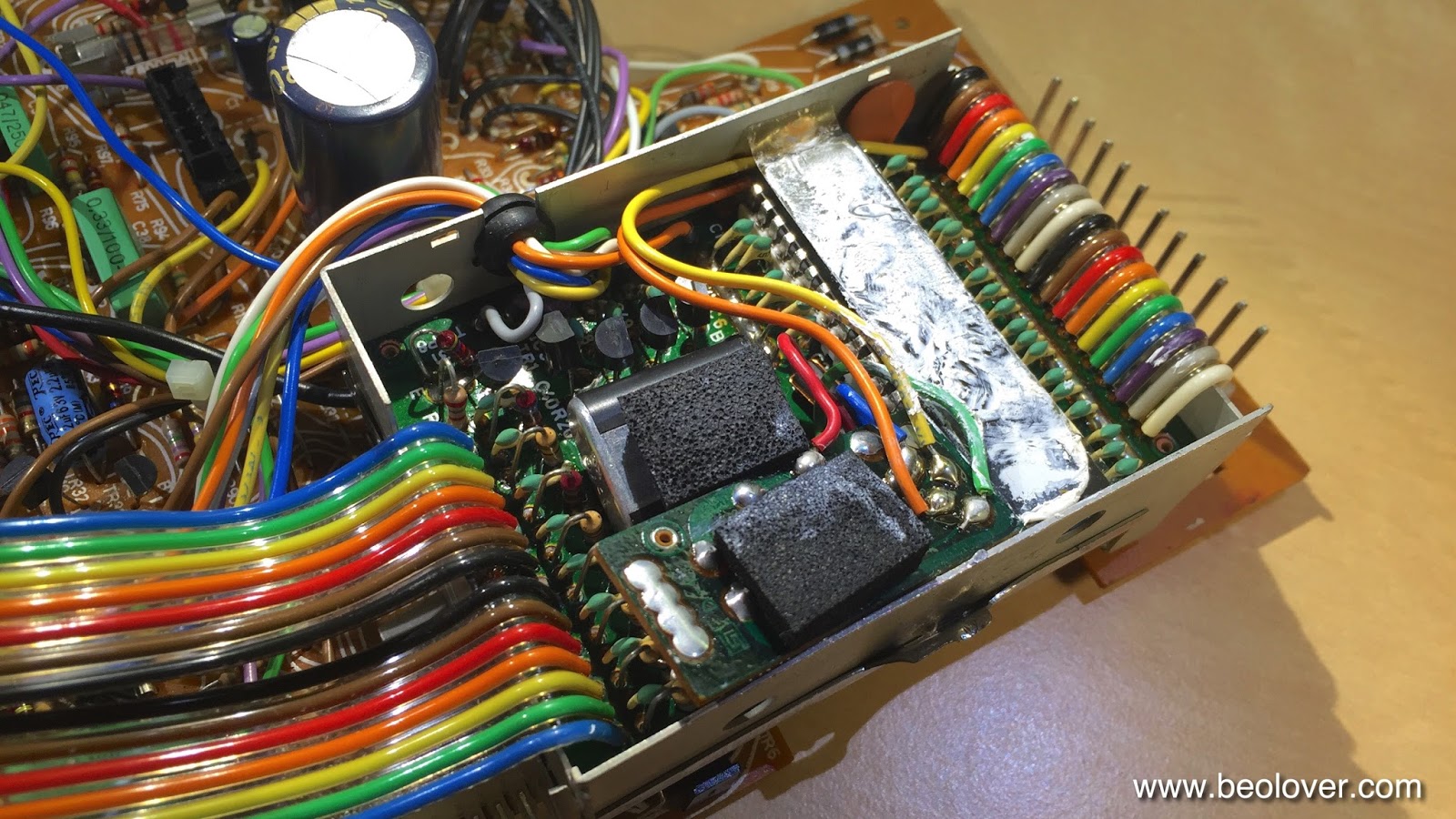
About half of the capacitors were already replaced. I cleaned up a few splashy solder points and then extracted the uProcessor can from the main PCB. then I opened it up:
The later added HEF4013 flipflop board is installed (the small PCB towards the front with a piece of foam on top). Apparently the output of the speed sensor amplifier was not clean enough to give a stable signal to the uProcessor and so they put this flipflop in-between (see sec. 8-4 in the Beogram 8000 Service Manual). Underneath this board the decoupling capacitor of the uProcessor is found. This picture shows the new one that I installed:
After this I buttoned the EMI can up and replaced the capacitor that sits underneath the can before mounting it again on the main PCB:

Here is a picture of the new one:
After that I went on to the 'Settling Circuit' and 'Control for uC' boards that are attached to the main board with one single screw:
After replacing the caps on them I cleaned up their mounting with a second M3 nut that gives the Settling Circuit a bit more space and takes some flex-stress out of the equation and put some decent insulation under the Settling Circuit board with Gorilla tape
which resulted in a straightened up arrangement.

A bit strange this entire design in my opinion...It almost appears that they designed it in several installments and kept adding circuits.

After replacing a few more easily accessible caps on the main board I finally put everything back together and then replaced the 47uF capacitor on the 5V regulator that is mounted to the bottom pan for heat dissipation:

This shows the new one: